
Floorplan Drawing Features (Manual)
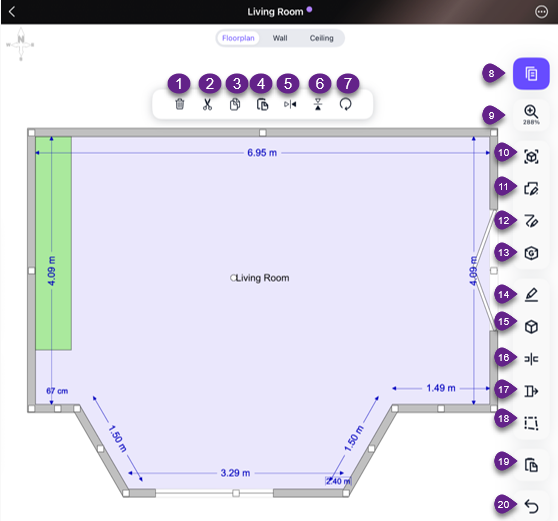
1/ Delete 11/ Default room shapes
2/ Cut 12/ Freeform
3/ Copy 13/ General Items box
4/ Paste 14/ Rename
5/ Mirror 15/ Insert block
6/ Flip 16/ Segment mode
7/ Rotate 17/ Build Out mode
8/ Estimate Mode 18/ Vertex mode
9/ Zoom 19/ Paste
10/ LiDAR 20/ Undo
Adding Openings
When selecting a wall, additional options appear.
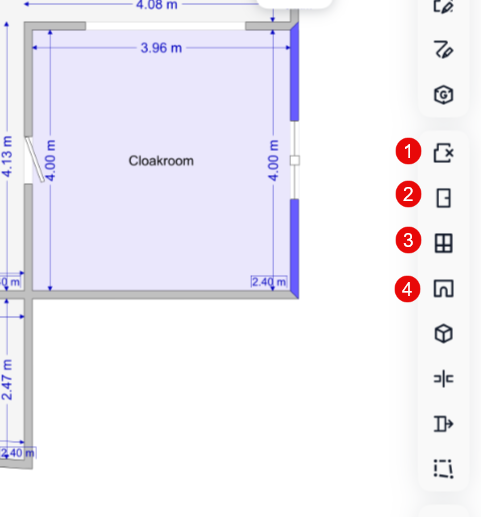
1/Remove wall
2/Add door
3/Add window
4/Add archway
These openings can be added to your floorplan by selecting a section of wall and tapping on opening you wish to add.
Was this article helpful?
That’s Great!
Thank you for your feedback
Sorry! We couldn't be helpful
Thank you for your feedback
Feedback sent
We appreciate your effort and will try to fix the article