
1. User Self-unblock
This feature improves the security process for users who enter an incorrect password to log into their account, including for users who block their accounts through entering incorrect credentials.
2. Blocking your Account
When entering your password incorrectly a warning message will appear letting you know that after too many attempts, your account will be temporarily blocked.
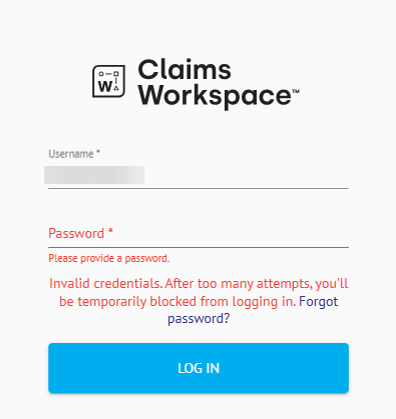
User accounts are blocked when incorrect login credentials are entered 4 times in a row, this is a security feature. Once your account has been blocked a new message will appear stating you will need to check your email for further instruction.
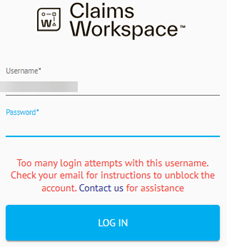
3. The Self-Unblocking Process
3.1 Receiving an Email
If you block your account, you will be directed to check your email inbox, where you will find clear instructions on how to unblock your account.
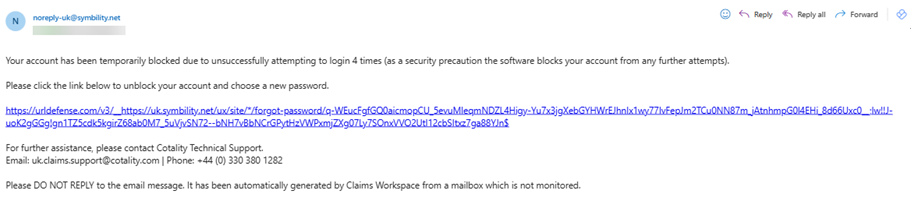
Simply click the link in the email in order for your account to be unblocked.
3.2 Resetting your Password
Once the link in your email has been selected, you will be redirected to Claims Workspace. Here you will need to enter your username and the email linked to your account.
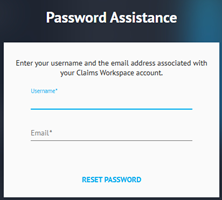
This will open the Password Reset box where you are prompted to enter your preferred password.
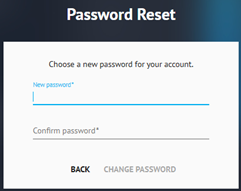
Please note that passwords require to adhere to the password complexity rules set out by your company.
Medium complexity: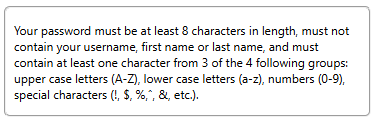
Strong complexity: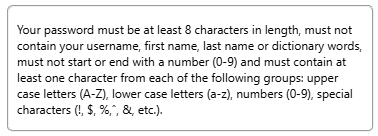

Was this article helpful?
That’s Great!
Thank you for your feedback
Sorry! We couldn't be helpful
Thank you for your feedback
Feedback sent
We appreciate your effort and will try to fix the article